Unified API Request Flow
The Unified API Request is like a translator and assistant that simplifies how your application talks to multiple services (like Salesforce, HubSpot, or Zendesk). Instead of learning how each service works (different rules, formats, and endpoints), you just make one request to the Unified API, and it handles all the complicated stuff for you. In this section, let's go through each step of the Unified API Request.
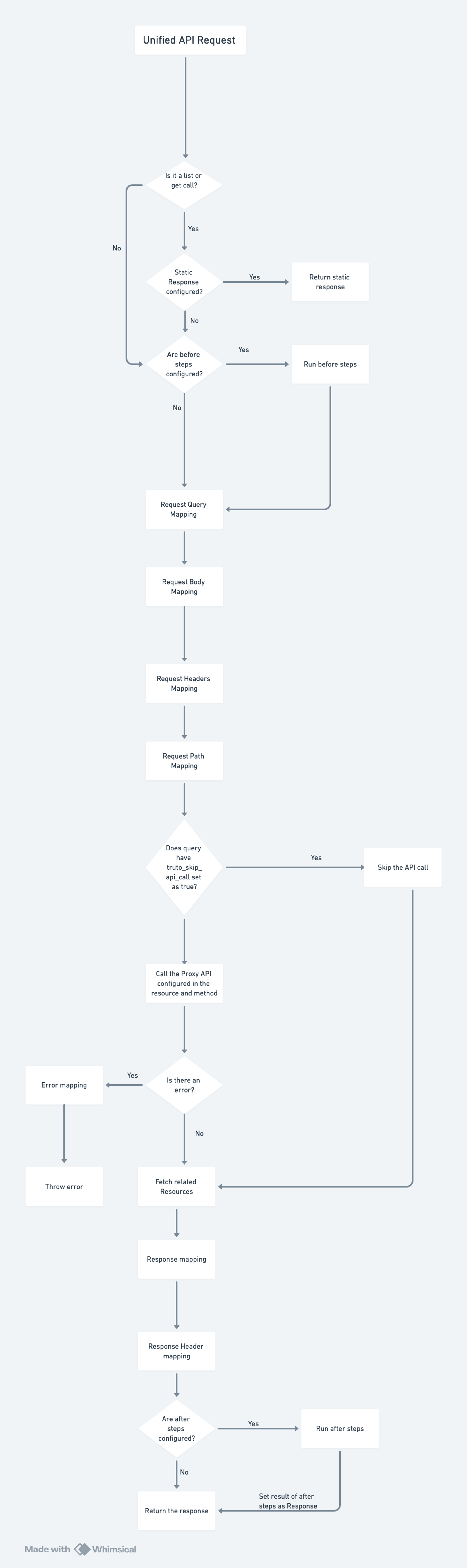
- Unified API Request
- What Happens Here?
The process starts when a user or application makes a request to the Unified API endpoint. For example:- Request:
GET /unified/crm/accounts?search_term=Archith.
- Request:
- What Happens Here?
- Is it a list,get call with static mapping?
- What Does This Mean?
Checks if the Unified API call is alistorgetcall. If it is, andStatic Mappingis enabled, the API call isn't made and theStatic Responseconfigured is returned.
- What Does This Mean?
- Are before steps configured?
- What Does This Mean?
Checks if there are any "before steps" configured for preprocessing the request. These steps are optional but can enhance or validate the request or fetch additional data which will be used in the Unified API call.
- What Does This Mean?
- Run before steps (if configured)
- What Happens Here?
If before steps exist, they are executed.
- What Happens Here?
- Request Query Mapping
- What Happens Here?
Maps or converts query parameters to match the requirements of the API (e.g., Salesforce). - Example:
- Unified API Query:
{ "name": "Truto", "city": "Bangalore" } - Mapped Query for Salesforce:
SELECT * FROM Account WHERE Name LIKE '%Truto%' AND BillingCity LIKE '%Bangalore%'.
- Unified API Query:
- What Happens Here?
- Request Body Mapping
- What Happens Here?
Adjusts or transforms the request body before sending it to the API. - Example:
- Unified API Body:
{ "name": "Archith's Business", "website": "www.archithbiz.com" } - Salesforce Mapped Body:
{
  "Name": "Archith's Business",
  "Website": "www.archithbiz.com"
}
- Unified API Body:
- What Happens Here?
- Request Headers Mapping
- What Happens Here?
Ensures required headers are included and formatted correctly.
- What Happens Here?
- Request Path Mapping
- What Happens Here?
Maps the API path from the Unified API to the provider API’s endpoint.
- What Happens Here?
- Does query have
truto_skip_api_callset to true?- What Happens Here?
Checks if the request includes a flag to skip the actual API call. When it is set, Truto does not call the provider API and runs the response mapping on an empty response (responseis an empty string). The response mapping decides what is returned, for example a result built fromcontext.before,queryorcontext. - Example:
- Input:
GET /unified/crm/accounts?truto_skip_api_call=true. - Output: Skips the Salesforce API call; the response mapping runs with an empty
response.
- Input:
- What Happens Here?
- Call the Proxy API configured in the resource and method
- What Happens Here?
Sends the actual request to the provider API (e.g., Salesforce). - Example:
- Translates:
- Unified API:
GET /unified/crm/accounts. - API:
GET /services/data/v57.0/sobjects/Account.
- Unified API:
- Translates:
- Is there an error?
- What Happens Here?
Checks if the API returned an error (e.g., 404 Not Found or 500 Internal Server Error).
- What Happens Here?
- Error Mapping (if there's an error)
- What Happens Here?
Converts errors into a standardized format. - Example:
- Salesforce Error:
{ "errorCode": "INVALID_FIELD", "message": "The field 'xyz' is not valid" } - Mapped Error for Unified API:
{
  "error": "Invalid request. The field 'xyz' is not supported."
}
- Salesforce Error:
- What Happens Here?
- Throw Error (if there's an error)
- What Happens Here?
Sends the mapped error back to the user and stops further processing.
- What Happens Here?
- Fetch Related Resources
- What Happens Here?
If additional data is needed, fetches them from the API. Usually this is used when the resource being fetched has parent-child relationship with another resource. For example, in Asana, workspace_id is needed to get the projects of that Workspace.
- What Happens Here?
- Response Mapping
- What Happens Here?
Converts the provider response into the Unified API’s format. - Example:
- Salesforce Response:
{ "Id": "0012w000024KwDeAAK", "Name": "Truto", "BillingCity": "Bangalore" } - Unified API Response:
{
  "id": "0012w000024KwDeAAK",
  "name": "Truto",
  "city": "Bangalore"
}
- Salesforce Response:
- What Happens Here?
- Response Header Mapping
- What Happens Here?
Adds or modifies response headers for the Unified API. - Example:
- Adds
rate-limitheaders:{ "X-RateLimit-Limit": 1000, "X-RateLimit-Remaining": 995 }
- Adds
- What Happens Here?
- Are after steps configured?
- What Happens Here?
Checks if any "after steps" are configured for postprocessing the response.
- What Happens Here?
- Run after steps (if configured)
- What Happens Here?
Runs the configured after steps in order:requeststeps that call another Unified or Proxy API,statesteps that compute a value with JSONata, andreplace_datasteps that set the data to an earlier step's result. - Example: After an
updatethat returns only the recordid, arequeststep callsgetto fetch the full record.
- What Happens Here?
- Set result of after steps as Response
- What Happens Here?
Updates the response with the output from the after steps (if any).
- What Happens Here?
- Return the Response
- What Happens Here?
Sends the final, processed response back to the user. - Example Final Response:
{
  "id": "0012w000024KwDeAAK",
  "name": "Truto",
  "city": "Bangalore",
  "phone": "123-456-7890"
}
- What Happens Here?