Overriding OAuth credentials
We understand that you may want to customize the way your users give your application permission to access their data. This process is known as authorization. In Truto, you can customize this authorization process by overriding OAuth credentials. Let's simplify this for you.
What does 'Overriding OAuth Credentials' mean?
OAuth (Open Authorization) is a standard that apps use to provide client applications with 'secure delegated access'. It's like a virtual handshake between the online platforms. Overriding OAuth credentials in Truto is akin to setting the terms of this virtual handshake yourself.
Customizing OAuth Details
In Truto, you have the power to customize or change the OAuth details, such as the Client ID and Client Secret. Think of these as unique identifiers for your application. Changing these details is like giving your application a new identity.
Defining Your Own Scopes
'Scopes' in OAuth determine what kind of access you're giving to your application. It's like defining the boundaries for your application's reach. In Truto, you can define these scopes according to your needs by looking into integrations API documentation for allowed scopes and how to add them.
The Result of Overriding OAuth Credentials
When you override the OAuth credentials, your customers will see an OAuth app asking for authorization from the application created by you, not the standard Truto process. This means they'll be interacting with the identity and boundaries you've set, creating a more personalized and secure experience for your users.
Until the app is configured
Some integrations ship with no OAuth app of Truto's own — their client id is a placeholder until you supply yours here. Until you do, such an integration is left out of the connect UI and the connections widget, and reauthorizing an existing account on it is refused with 400 and truto_error_code: app_credentials_not_configured when no other sign-in method can connect it (see Reauthorizing connections). Integrations where the end user types the client id on the connect form are not affected.
AWS STS integrations work the same way with their own toggle: Configuration tab → Use your own signing credentials, where you enter the IAM access key pair that signs AssumeRole. The API's refusal message calls both places Integration Settings.
Install an integration
Before overriding the OAuth credentials for an integration, make sure to install it from Available Integrations. You can check the documentation for installing an integration here.
Steps to Overriding OAuth
-
Click on
Integrationsand select the integration you want for overriding OAuth inInstalledintegrations.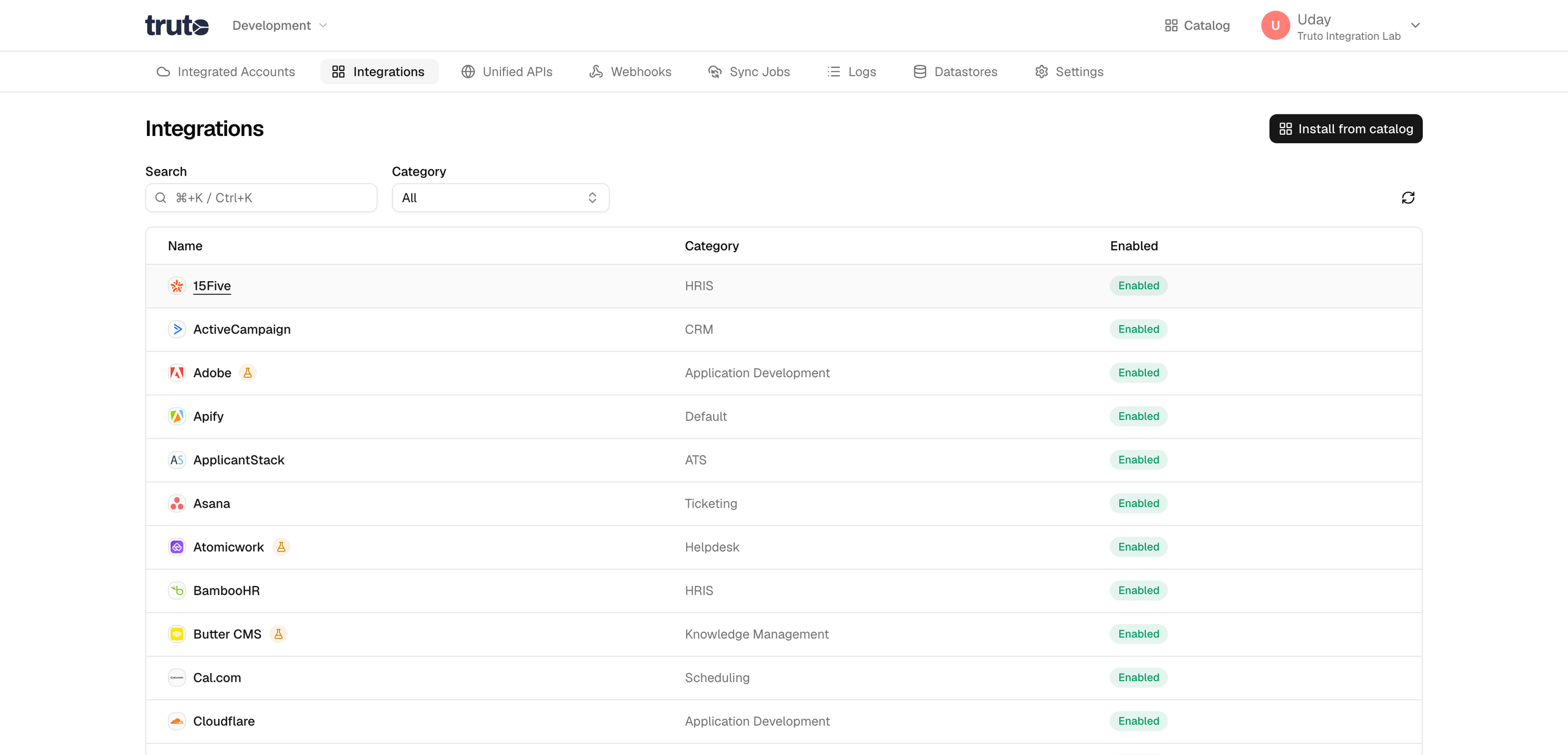
-
Open the Configuration tab and toggle Use your own OAuth settings. Add the Redirect URL from Truto to the OAuth app you created, then enter your
Client ID,Client Secret, andScopes(if you need to define them) from that app.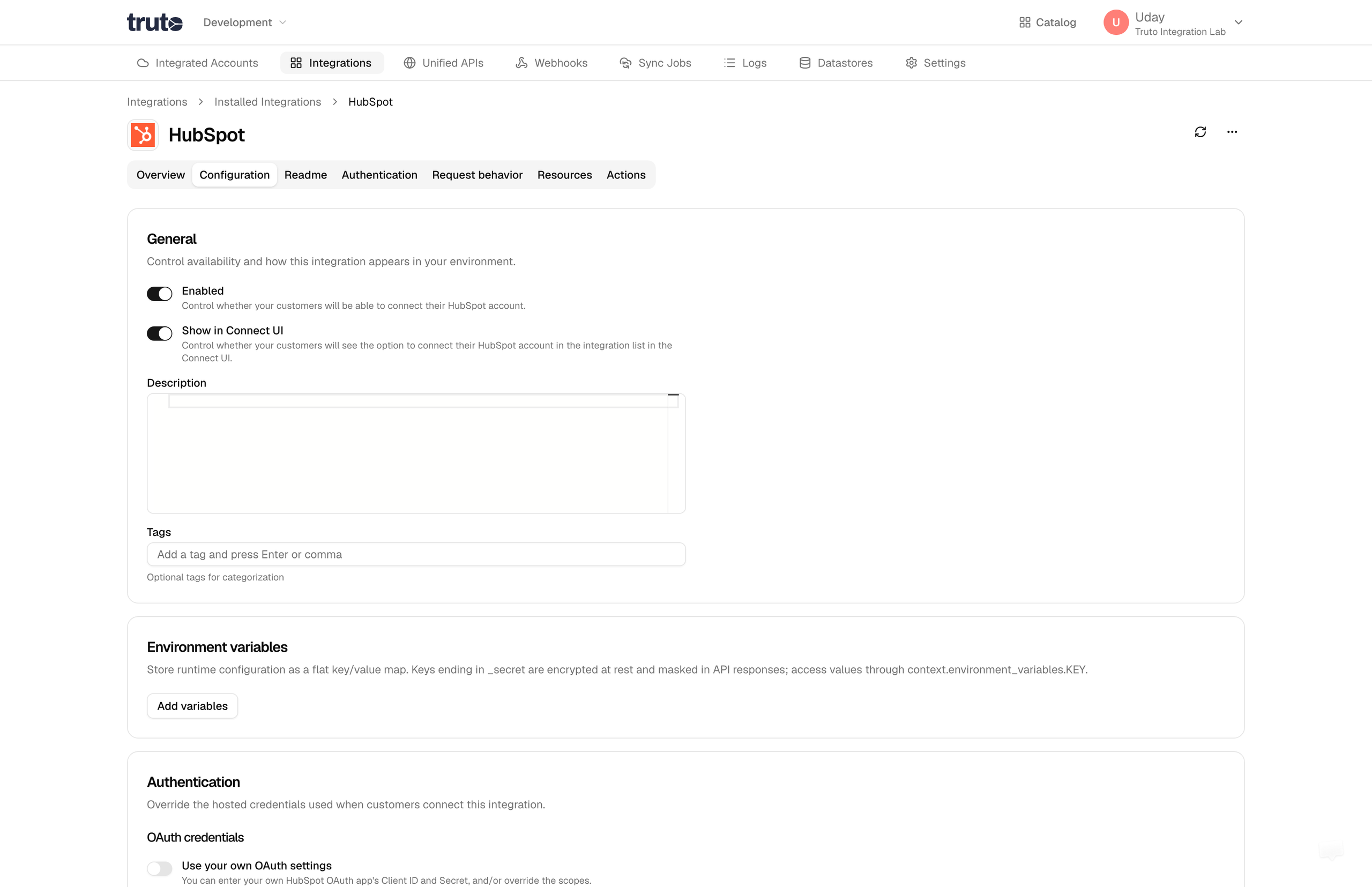
-
Click on
Saveafter adding the details mentioned above. -
Voila! You should now see that
Saveis disabled. You can now use your OAuth App.
Use a redirect URL on your own domain
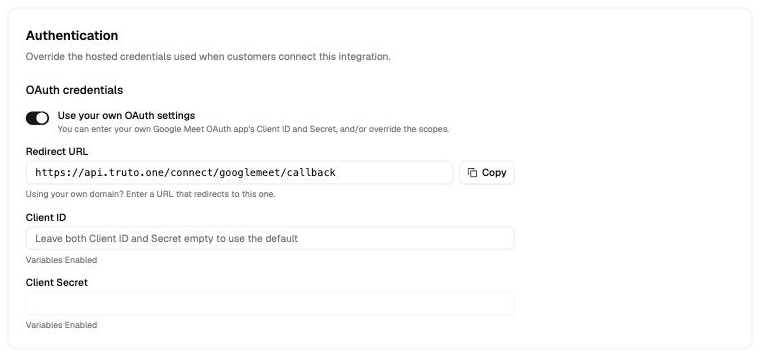
By default, the provider sends your users back to Truto's callback, for example https://api.truto.one/connect/hubspot/callback. Some providers show this URL on their consent screen, and some app reviews ask for a URL on your own domain. You can use your own URL instead, for each installed integration.
This works only for OAuth 2.0 integrations that use your own Client ID and Client Secret. Truto's OAuth app accepts only Truto's callback, so Truto will not save a custom redirect URL until you add your own credentials.
1. Add a redirect page on your domain
Your URL must send the browser on to Truto's callback with a redirect. Keep the query string exactly as it came in: the provider puts the code and state there, and Truto needs both.
- The URL must use
https. - The URL cannot have a
#fragment.
We recommend that you change only the domain, and keep Truto's path:
| URL | |
|---|---|
| Truto's callback | https://api.truto.one/connect/hubspot/callback |
| Your URL | https://auth.example.com/connect/hubspot/callback |
Then one redirect rule works for every integration: send the browser to api.truto.one with the same path and query string. When you add another integration later, you do not have to change the rule.
Truto's callback for each integration shows in the Redirect URL field.
Use a temporary redirect (302 or 307), so browsers do not cache it. For example:
location ~ ^/connect/[^/]+/callback$ {
  return 302 https://api.truto.one$request_uri;
}
# .htaccess or the site config
RewriteEngine On
RewriteRule ^/?connect/([^/]+)/callback$ https://api.truto.one/connect/$1/callback [R=302,L]# Caddyfile
@trutoCallback path_regexp ^/connect/[^/]+/callback$
redir @trutoCallback https://api.truto.one{uri} 302// Cloudflare Worker
export default {
fetch(request) {
const { pathname, search } = new URL(request.url)
if (!/^\/connect\/[^/]+\/callback$/.test(pathname)) {
return new Response('Not found', { status: 404 })
}
return Response.redirect(`https://api.truto.one${pathname}${search}`, 302)
},
}{
"redirects": [
{
"source": "/connect/:integration/callback",
"destination": "https://api.truto.one/connect/:integration/callback",
"permanent": false
}
]
}# _redirects
/connect/:integration/callback https://api.truto.one/connect/:integration/callback 302// next.config.js
module.exports = {
async redirects() {
return [
{
source: '/connect/:integration/callback',
destination: 'https://api.truto.one/connect/:integration/callback',
permanent: false,
},
]
},
}app.get('/connect/:integration/callback', (req, res) => {
res.redirect(302, `https://api.truto.one${req.originalUrl}`)
})On Vercel, the rule goes in vercel.json.
2. Register the URL in your OAuth app
In the provider's developer console, add your URL as an allowed redirect URL (it is sometimes called a callback URL) in your OAuth app. You can keep Truto's callback in the list too.
3. Set the URL in Truto
- Open the installed integration and turn on
Use your own OAuth settings. - Add your
Client IDandClient Secret. - In
Redirect URL, replaceapi.truto.onewith your domain. Keep the rest of the URL. - Click
Save.
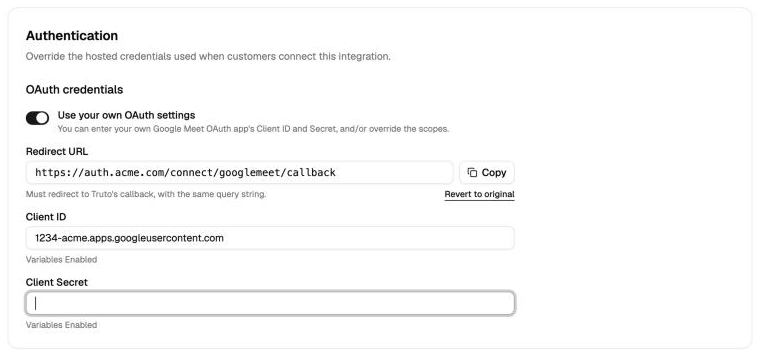
You can also set the URL in the install dialog and on the integration's Authentication tab.
If you enter a URL before you add your own Client ID, a Needs your own OAuth app warning shows, and Save is refused until you add one.
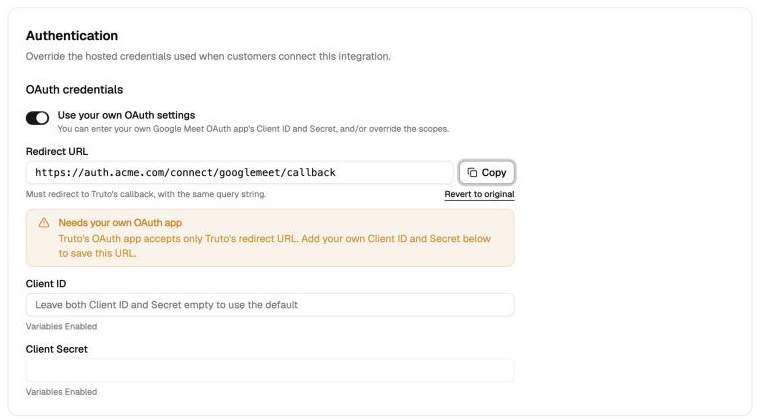
To go back to Truto's callback, click Revert to original under the field, or clear the field. Then click Save.
What changes
- Truto sends your URL on the authorize step and on the token exchange. Where the integration also sends a redirect URL when it refreshes a token, Truto sends yours there too.
- New connections and reconnections use your URL. Accounts that are already connected keep their tokens.
- The URL applies only to this environment. Other environments keep their own settings.
- OAuth 1.0 integrations always use Truto's callback.
Set the URL with the API
The URL is stored in the environment integration's override, at credentials.oauth2.config.params.redirect_uri (the authorize step) and credentials.oauth2.config.tokenParams.redirect_uri (the token exchange). Set both to the same URL, or the provider rejects the code.
PATCH /environment-integration/{id} replaces the whole override. So first get the environment integration, add the two keys to its override, and send the full override back. A Client Secret you leave out is kept.
{
  "override": {
    "credentials": {
      "oauth2": {
        "config": {
          "client": { "id": "your-client-id" },
          "params": {
            "redirect_uri": "https://auth.example.com/connect/hubspot/callback"
          },
          "tokenParams": {
            "redirect_uri": "https://auth.example.com/connect/hubspot/callback"
          }
        }
      }
    }
  }
}
The API does not check that the override has your own Client ID. Set one, or every connection fails with a redirect_uri_mismatch error.
To Summarize
Overriding OAuth Credentials in Truto is all about customization. It gives you the power to modify the OAuth details and define the scopes, which results in a unique and personalized authorization experience for your users. It's another way Truto helps you make your interaction with APIs a smooth and efficient process.