Overriding Unified API mappings
To support use cases where some of your customers might be using a specific custom fields for a resource, you can override the Unified API mappings on an Integrated account level (applies to only that specified integrated account) or Environment level (applies to multiples integrated accounts in that environment). This will allow you to map the custom fields to the Unified API fields.
How overrides are applied
Environment and integrated account overrides combine with the base mapping differently.
- Environment override. Each JSONata mapping field you set (
response_mapping,query_mapping,request_body_mapping, and so on) replaces that whole field in the base mapping for every integrated account in the environment. Fields you don't set keep the base mapping. Aresponse_mappingoverride is the complete expression for the response, so it must return every unified field you want, not only the new ones. - Integrated account override. Truto evaluates the account's
response_mappingagainst the sameremote_dataand merges its result on top of the result from Step 1. Attributes returned by both are overwritten by the account override, and new attributes are added to the unified API response. An account override only needs the fields you want to change or add.
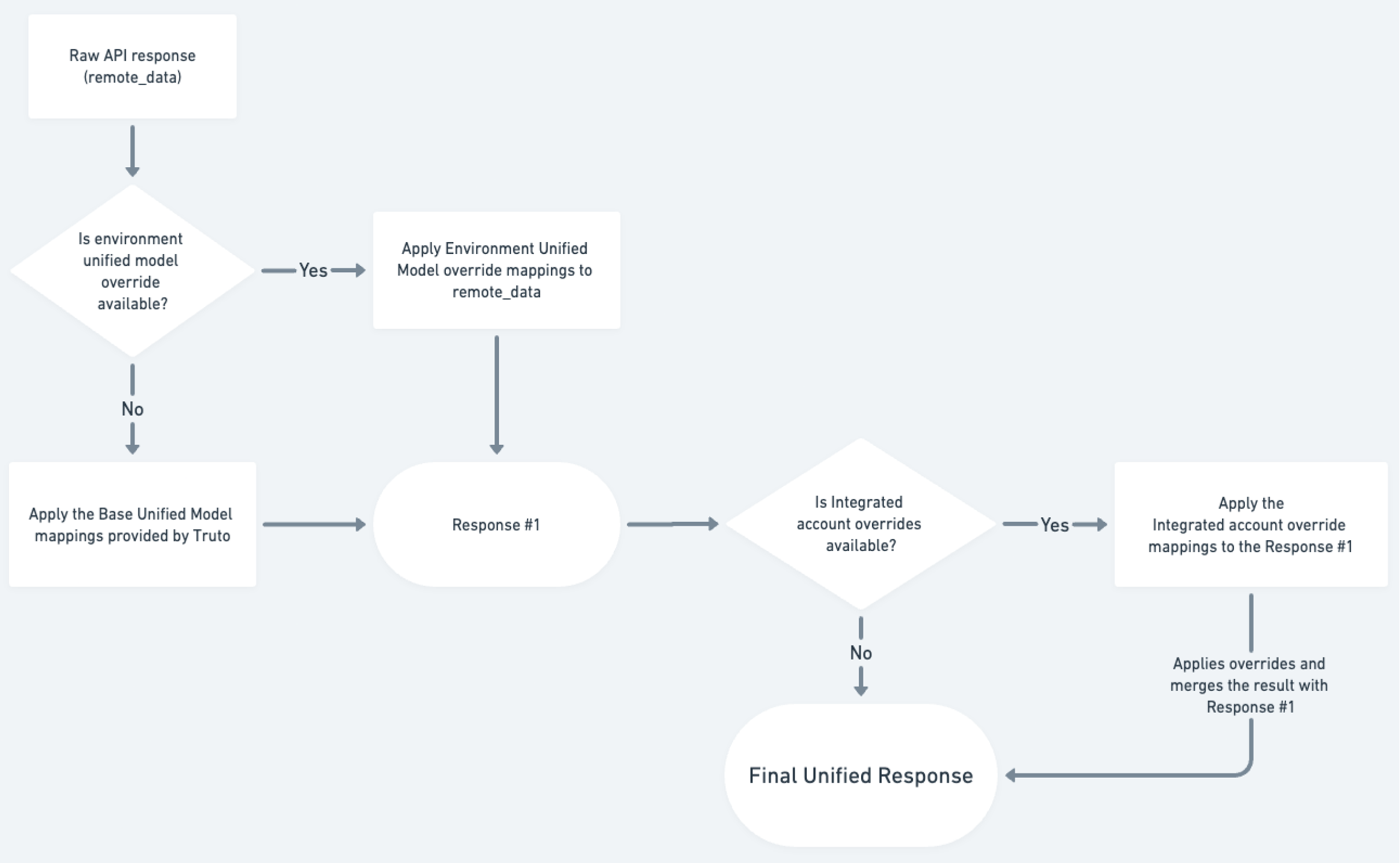
How to specify an override for an Integrated account
Let's take an example of HiBob, where we want to specify an override to get the date_of_birth for an employee and adding a query_param name.
To do this,
- Get the integrated account ID from the UI or the API where you want to apply the override.
- Make a PATCH request on the integrated account resource with the override details.
For the example mentioned before, you'll have to make the following API request,
curl --location --request PATCH 'https://api.truto.one/integrated-account/<integrated_account_id>' \
--header 'Content-Type: application/json' \
--header 'Authorization: Bearer <your_api_key>' \
--data '{
    "unified_model_override": {
        "hris": {
            "employees": {
                "list": {
                    "query_mapping": "{ \"fullName\": query.name }",
                    "response_mapping": "{ \"date_of_birth\": response.personal.shortBirthDate }"
                }
            }
        }
    }
}'
The request body contains the following,
unified_model_overrideThis is the object which specifies the overrideshrisThis is the name of the Unified Model. You can find this on the Unified Model details page in the UI.employeesThis is the resource you want to specify the override for.listThe overridden methodquery_mappingSince we want to add query_paramnameto filter the results based on the name input, we specify thequery_mappingwhich is a JSONata expression.nameis mapped to the query parameterfullNamewhich is accepted by the HiBob API.response_mappingSince we want to change the response, we specify theresponse_mappingwhich is a JSONata expression. Theremote_datais present inresponseobject within the JSONata expression.
Now you can go ahead and make the LIST /unified/hris/employees API request for the integrated account and it should return you the data with date_of_birth added to it.
How to specify an override for an Environment
Overriding Unified API mappings in Truto allows you to customize how data is translated between your systems and the Unified API. Follow these steps to override and adjust API mappings according to your environment and requirements:
1. Navigate to the Unified API Mapping
- Go to Unified APIs → Installed Unified APIs in your Truto dashboard and open the Unified API.
- Open the Resources tab, select the resource, and switch to its Mapping tab.
- From the Integration dropdown, choose the integration you want to modify.
- Identify the specific API method you wish to override and click on the pencil icon next to it.
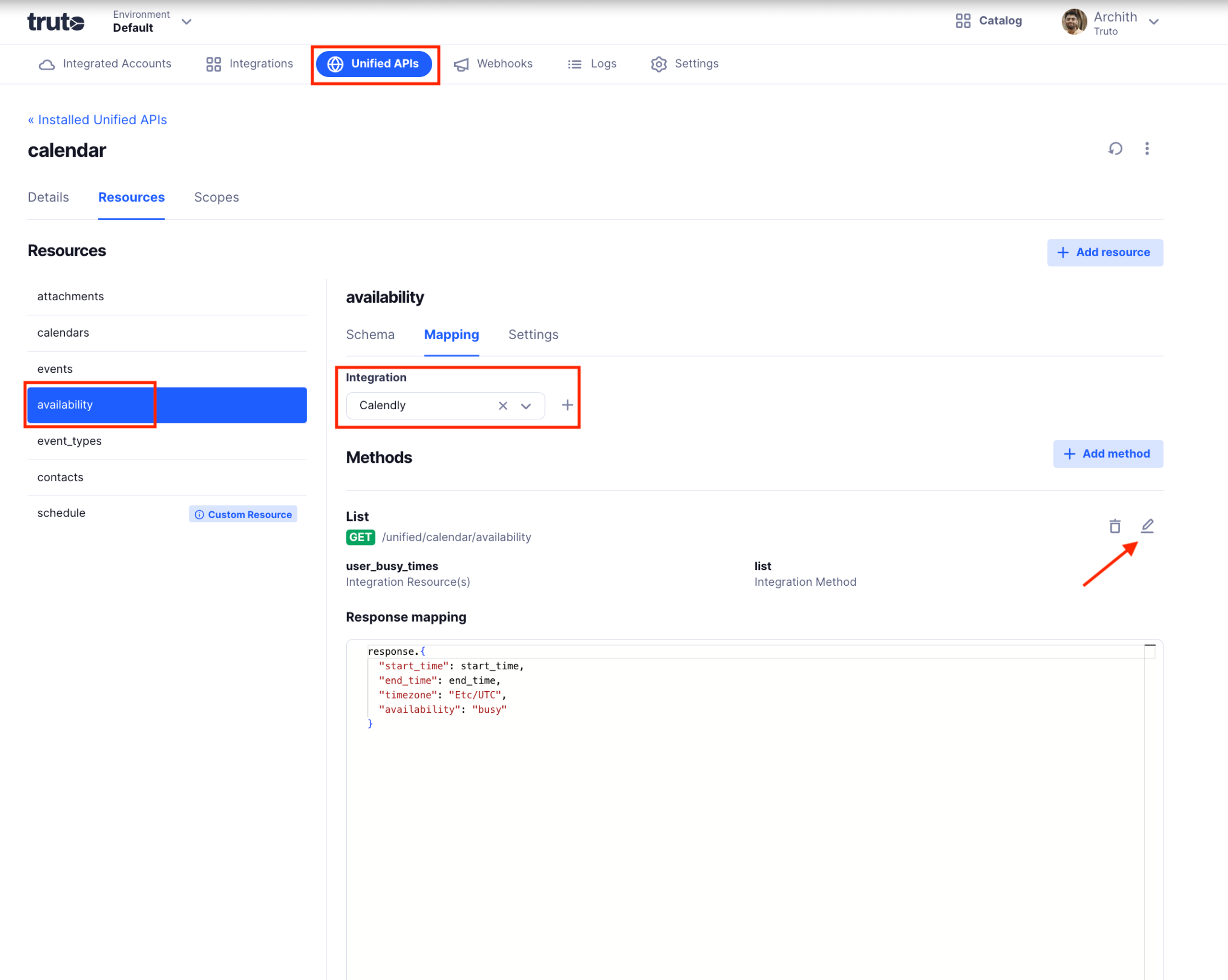
2. Open the Mapping Modal
Clicking the pencil icon opens a modal window containing various mapping configurations. Inside this modal, you will see separate sections for:
- Query Mapping
- Request Body Mapping
- Response Mapping
- Error Mapping
- Request Header Mapping
- Response Header Mapping
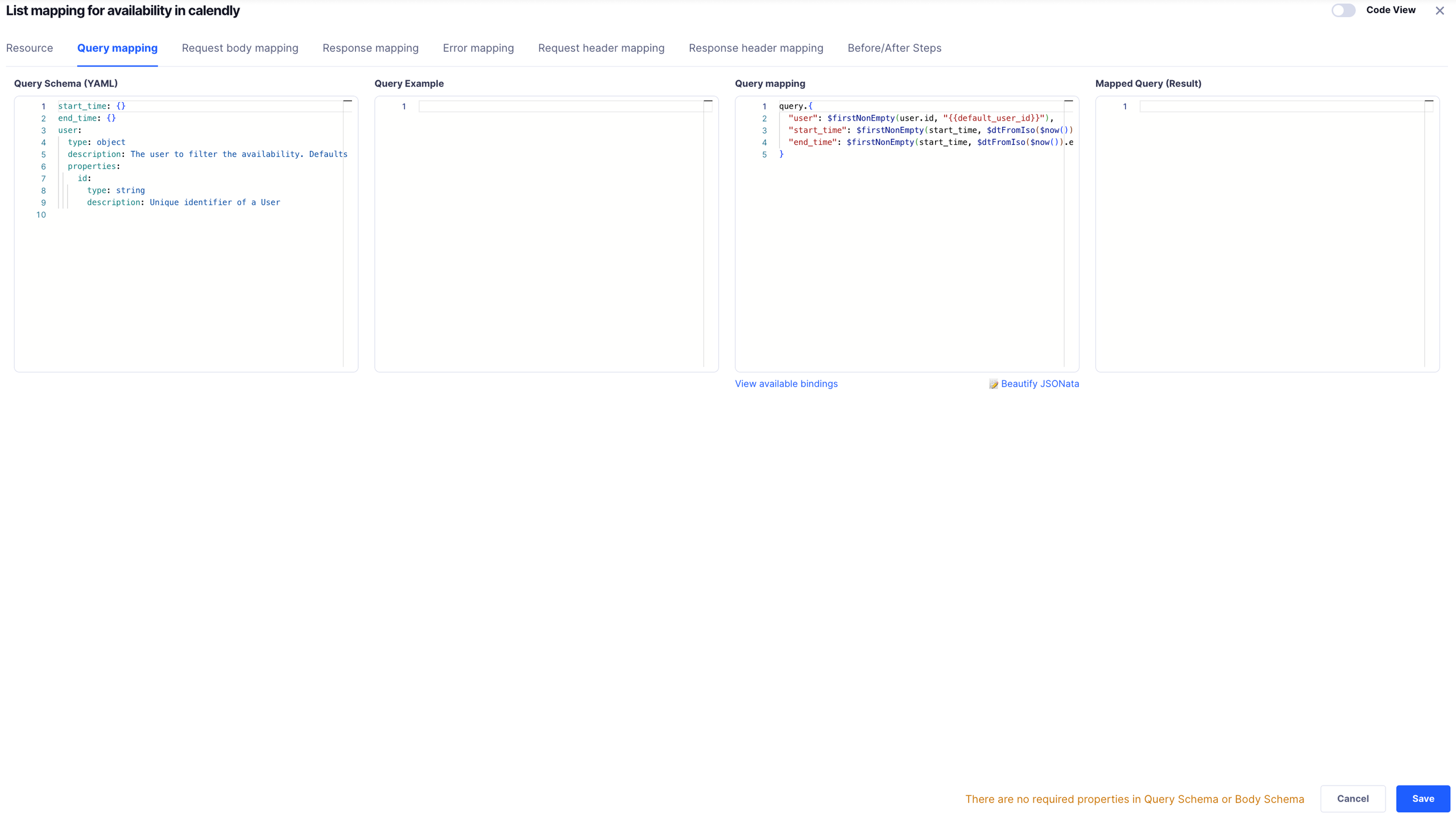
Alternatively, you can edit the mappings altogether by toggling the Code view. It opens up a YAML configuration that looks like -
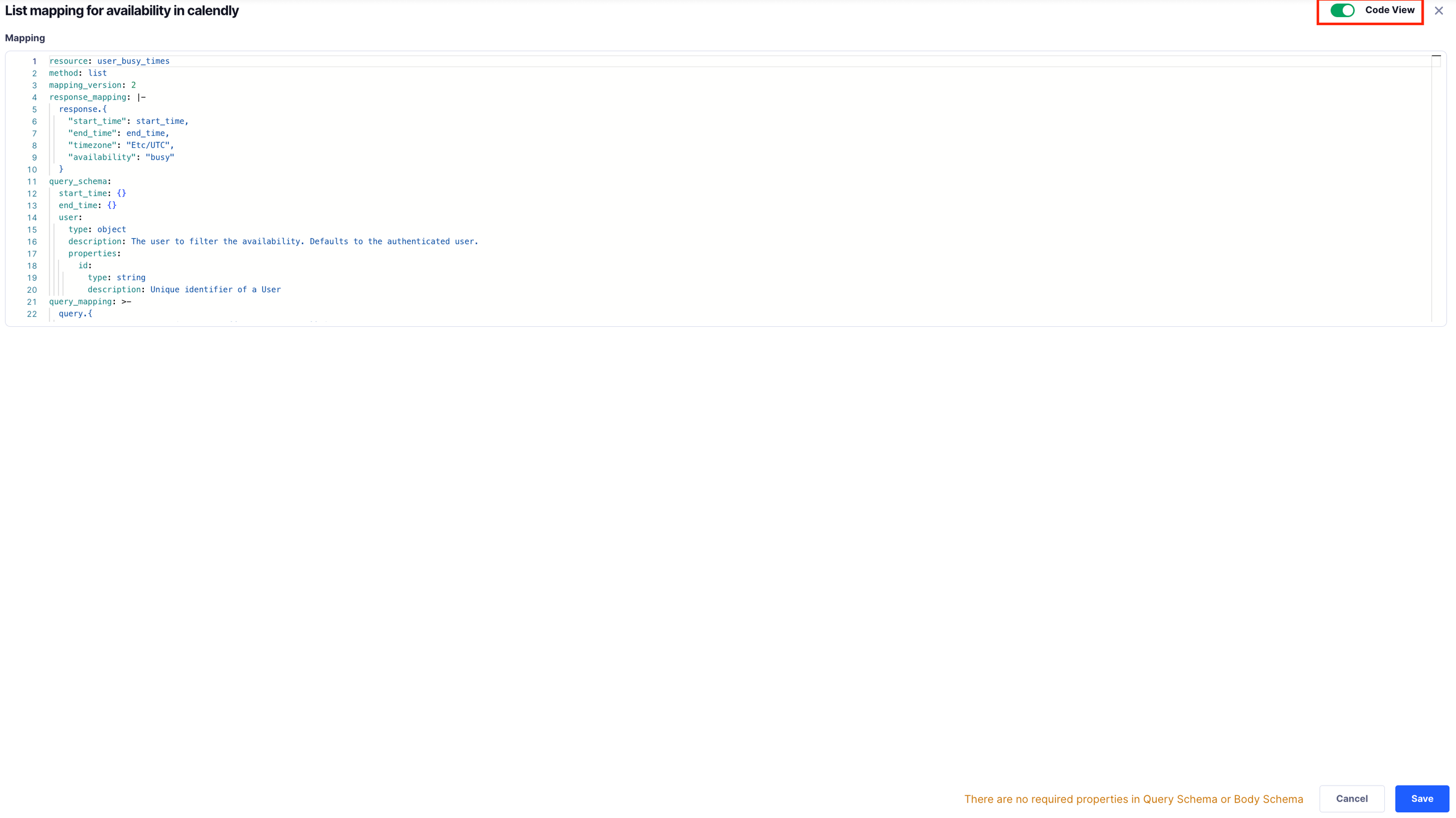
3. Modify and Override the Mappings
- Change the Mappings:
- Delete Fields: Remove any fields that are not relevant to your integration needs.
- Add Extra Fields: Insert new fields or parameters as necessary to tailor the request, response, headers, or error handling.
- Modify Existing Fields: Adjust the field structure, data types, or
JSONatatransformation logic to align with your specific use case.
How to specify an override for an Environment thorough API
Let's take an example of HiBob, where we want to specify an override to get the date_of_birth for an employee and add a query param name.
To do this,
- Get the installed unified model ID by specifying the name of the unified model in the following API request. The
idof the returned record is theenvironment_unified_model_id.
curl --location 'https://api.truto.one/environment-unified-model?unified_model.name=<unified_model_name>' \
--header 'Content-Type: application/json' \
--header 'Authorization: Bearer <your_api_key>'- Make a POST request to create an environment mapping override for the resource, integration and method.
For the example mentioned before, you'll have to make the following API request,
curl --location --request POST 'https://api.truto.one/environment-unified-model-resource-method' \
--header 'Content-Type: application/json' \
--header 'Authorization: Bearer <your_api_key>' \
--data '{
    "environment_unified_model_id": "<installed_unified_model_id>",
    "resource_name": "employees",
    "integration_name": "hibob",
    "method_name": "list",
    "config": {
        "query_mapping": "{ \"fullName\": query.name }",
        "response_mapping": "{ /* every field from the base response_mapping */ \"id\": response.id, \"date_of_birth\": response.personal.shortBirthDate }"
    }
}'
The request body contains the following,
environment_unified_model_idThe ID of the installed unified model from Step 1.resource_nameThis is the resource you want to specify the override for.integration_nameThis is the integration name you want to specify the override for.method_nameThe overridden method.configThe mapping fields to override. Each field you set replaces the same field in the base mapping.query_mappingSince we want to add query_paramnameto filter the results based on the name input, we specify thequery_mappingwhich is a JSONata expression.nameis mapped to the query parameterfullNamewhich is accepted by the HiBob API.response_mappingSince we want to change the response, we specify theresponse_mappingwhich is a JSONata expression. Theremote_datais present inresponseobject within the JSONata expression. This expression replaces the baseresponse_mapping, so start from the base mapping and adddate_of_birthto it. To see the mapping currently in effect, callGET /environment-unified-model-resource-method?environment_unified_model_id=<installed_unified_model_id>&resource_name=employees&integration_name=hibob&apply_overrides=true.
Each environment can have one override per resource, integration and method. To change an existing override, find its id and current version with GET /environment-unified-model-resource-method?environment_unified_model_id=<installed_unified_model_id>&resource_name=employees&integration_name=hibob&method_name=list, then send a PATCH request with the complete config you want. The config you send replaces the stored one, and a stale version is rejected with a 400.
curl --location --request PATCH 'https://api.truto.one/environment-unified-model-resource-method/<id>' \
--header 'Content-Type: application/json' \
--header 'Authorization: Bearer <your_api_key>' \
--data '{
    "version": <version>,
    "config": {
        "query_mapping": "{ \"fullName\": query.name }",
        "response_mapping": "{ /* every field from the base response_mapping */ \"id\": response.id, \"date_of_birth\": response.personal.shortBirthDate }"
    }
}'
To remove the override and fall back to the base mapping, send DELETE /environment-unified-model-resource-method/<id>.
Now you can go ahead and make the LIST /unified/hris/employees API request for the integrated accounts in the environment and it should return you the data with date_of_birth added to it for all of the integrated accounts in the specified environment.
Bindings available to use in response_mappings
Bindings are the data that are sent in the Unified API call, which can be used in response_mappings to apply overrides as per your needs.
responseThis is the raw API response returned by the API call.
{
  "response": {
    "personal": {
      "shortBirthDate": "1990-01-01"
    }
  }
}
rawQueryThis is the object that contains the raw query parameters sent in the Unified API request.
{
  "fullName": rawQuery.name
}
queryThis is the object which specified the query params after mapping is applied as needed by the integration.
{
  "fullName": query.name
}
Consider an example of query_mapping where the contact resource is mapped to person_id in the following way -
{
  "person_id": rawQuery.contact.id
}
Now, if you need to map the contact resource in the response_mapping, you can do in the following ways -
{
  "contact": {
    "id": query.person_id
  }
}
or
{
  "contact": {
    "id": rawQuery.contact.id
  }
}
bodyThis is the request body after Body Mapping, as sent to the underlying API.
{
  "fullName": body.name
}
contextThis is the object that contains all the variables stored in your Integrated account.
{
  "fullName": context.name
}
Read more about Bindings
Available JSONata bindings in mappings
JSONata methods are lifesavers while writing overrides for transforming the raw API response to the Unified API response schema. You can refer to Truto JSONata to know more about the methods supported.